Supervised Fine Tuning
Supervised Fine Tuning (SFT) lets you fine-tune Newton using curated examples of your custom data or use case. This process can help Newton adapt to your unique sensor configuration or transfer domain knowledge to Newton to unlock your specific use case. The result of fine-tuning Newton is a new instance of Newton that can be identified with a specific model_id. The fine-tuned version of Newton is encrypted and access-controlled with visibility to your organization only.Labeled Examples
SFT relies on high-quality examples to help steer a pre-trained instance of Newton to a new sensor configuration or use case. Each labeled example consists of an input and output pair in JSON or YAML format. This provides Newton the information required to understand that given input X, it should generate output Y. As Newton is a multimodal modal, here the input (X) can consist of one-or-more sensor types, with the output (Y) currently constrained to text output. Some examples of X, Y pairs are:Sensor Log Example
The following example shows a fine-tuning instance that maps a short sensor log to a text output. In this case, motion sensor readings from a retail store are converted into a simple report describing a customer’s movement through the space The input data used in this example is a data.text event containing a list of sensor logs. The output data used in this example is a data.text event containing the desired output response of the model.Base64 Image Example
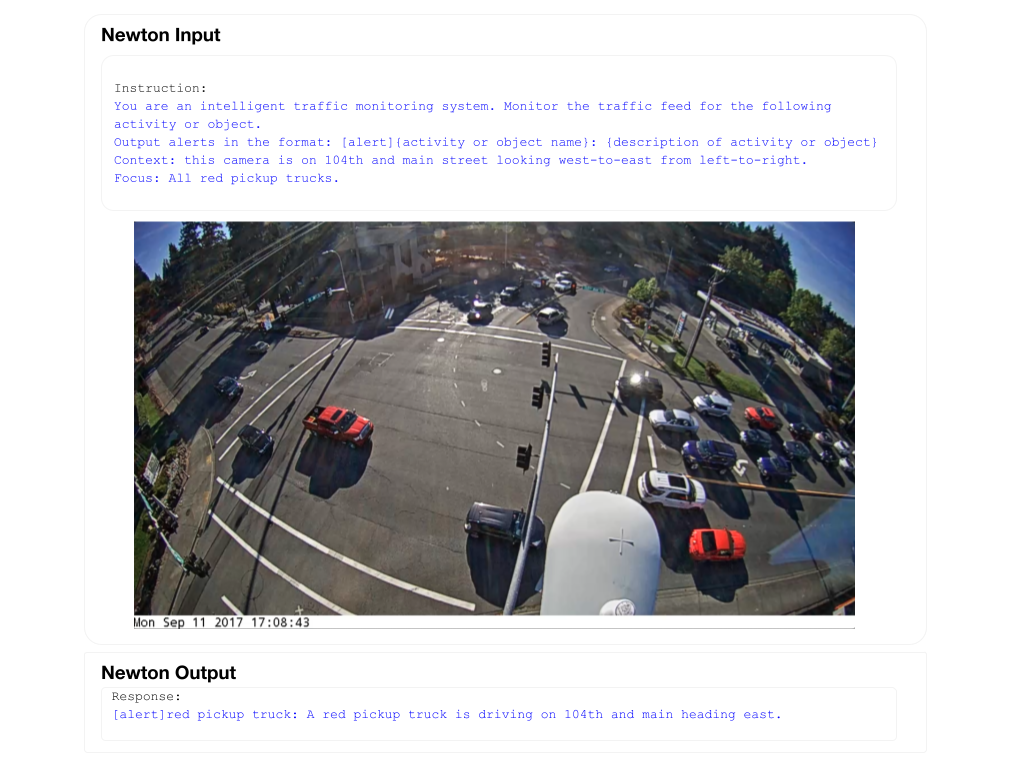
The example below shows a fine-tuning instance that maps a base64-encoded image to a text output. In this case, the model generates traffic alerts, with a specific rule to issue an alert whenever a red pickup truck is detected. The input data used in this example is a single base64 encoded image as a data.base64_img event. The output data used in this example is a data.text event containing the desired output response of the model.