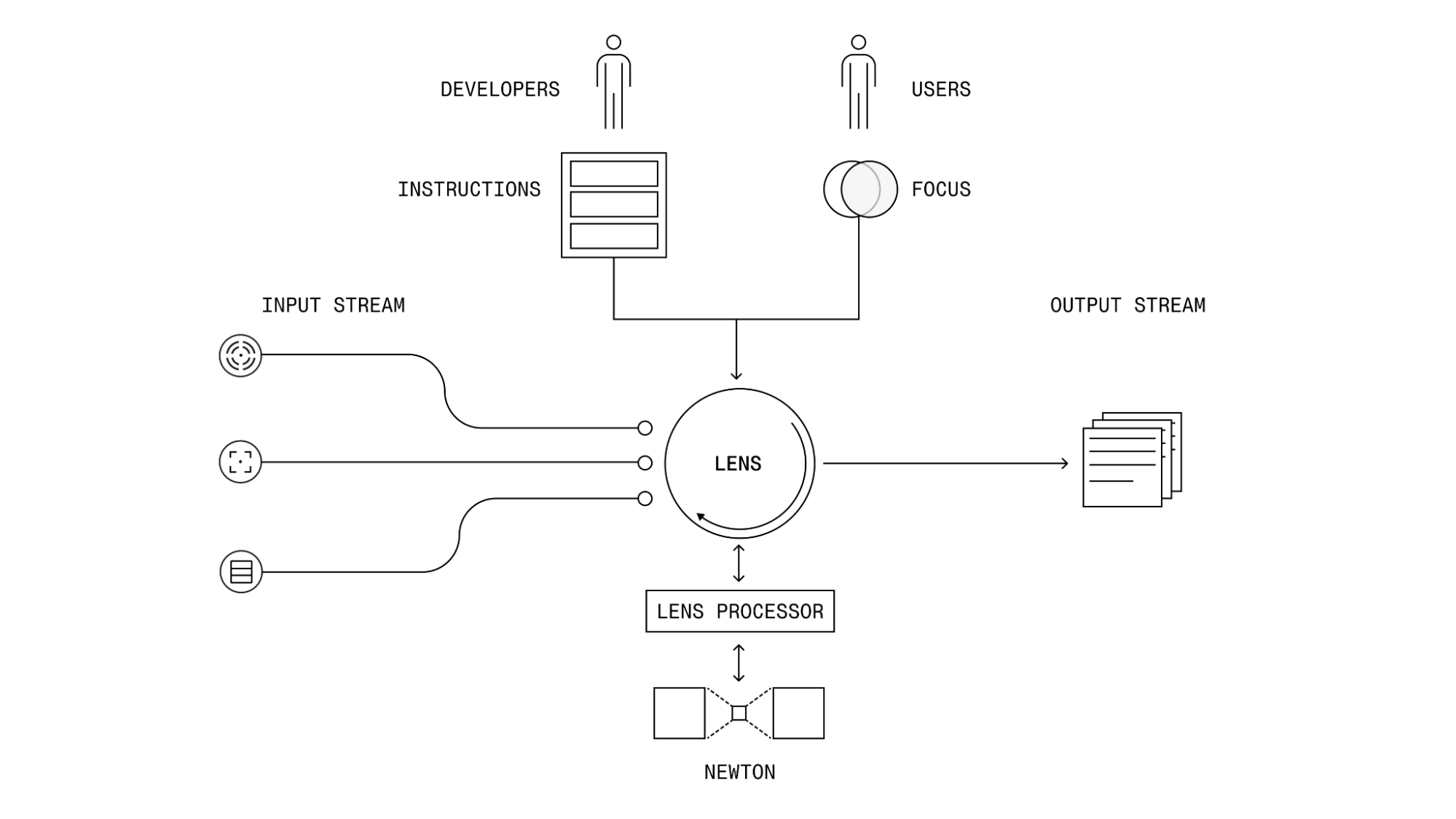
A Lens is a software interface that allows developers to configure and interact with Newton. Lenses define how sensor data flows in and out of Newton and specify how Newton should interpret that data for a given use case. By configuring a Lens, developers can direct Newton’s interpretive capabilities to solve domain-specific problems or tasks. A developer can customize a premade Lens or create one from scratch using natural language instructions. In essence, a Lens provide Newton with Instructions (Control Stream) on how to transform raw sensor data (Input Stream) into a desired interpretation (Output Stream). Newton Lens Overview There are two main components that allow a developer to customize a lens for their unique use case:
  1. Lens Parameters: how a developer can customize a lens, such as setting the instruction, focus, and temporal parameters
  2. Lens Data Streams: how a developer gets real-time or pre-recorded data in/out of a lens.
In this version of the platform, developers can create new lenses only by adjusting key parameters of what we have called “starter lenses”. Specifically, we have created two Starter Lenses:

Lens Parameters

Each Lens is defined via a lens config, which defines the key parameters of the lens. Every Lens has a unique lens ID which allows a developer to pass a single reference across the Newton Platform to load, run, and modify specific lenses. A Lens config can be written as a YAML file and passed to the Archetype Platform via the Lens APIs. An example of the Activity Monitor Lens config is shown below:
lens_name: Example Safety Lens
lens_parameters:
  instruction: |
    You are an intelligent camera that monitors for safety violations. Monitor the incoming sensor data and output an alert if any unsafe behavior is observed.
  focus: safety equipment, hazards
  temporal_focus: 5
model_parameters:
  model_version: Newton::c2_1_250408d4362cc9
For detailed inforation about lens parameters, visit the Activity Monitor Lens or Machine State Lens pages.

Lens Data Streams

Each Lens supports processing of real-time or pre-recorded sensor data using a set of general input and output data streams. All Lenses support three categories of data streams:
  • Input Streams: used for streaming sensor data into a lens (e.g. streaming a pre-recorded video into a lens)
  • Output Streams: used for streaming results out of a lens (e.g. sending inference results to an app via Server Side Events)
  • Control Streams: used for managing a lens session (e.g. starting/stopping/modifying a lens)
Developers can stream either live or pre-recorded data in/out of Newton by attaching a specific stream to a Lens using a dedicated data connector. Common data connectors include input file readers, such as CSV file readers or video file readers, or live sensor readers, such as Kafka or RTSP cameras. The full list of data connectors can be found in the Data Connectors page.