

This example runs on an NVIDIA DGX Spark (GB10 Grace Blackwell, 128 GB unified memory). Newton Fusion, the VSS agent’s LLM (NVIDIA Nemotron Nano 9B v2) and the rest of VSS all run on the one box, with no cloud calls at run time.
How it works

- You ask a question about an uploaded video.
- The VSS agent’s planner (Nemotron) decides to call its
video_understandingtool. - VSS sends the video to Newton Fusion’s endpoint as a Chat Completions request, with the MP4 inline.
- Newton Fusion answers from the frames and the speech transcript. Nemotron then writes the final reply.
Models
Newton Fusion replaces VSS’s default local VLM (NVIDIA Cosmos), which isn’t deployed.
Why the model is called newton-fusion-omni-f1.0
VSS 3.2.1 decides what to send its VLM from the model’s name:
Newton Fusion’s endpoint therefore serves the model under the name
newton-fusion-omni-f1.0, so VSS sends it the whole video with its sound. The weights are the same as Newton Fusion F1.0.
Requirements
- An NVIDIA DGX Spark, with Docker and the NVIDIA container runtime (included in DGX OS)
- NVIDIA VSS 3.2.1
- An NGC personal key with the NGC Catalog service, to pull the VSS containers (step 2)
- Newton Fusion’s endpoint package from Archetype AI (step 0)
Set it up
0
Get Newton Fusion's endpoint (Workstation, then Spark)
Contact [email protected] for the endpoint package. It contains the serving software for the DGX Spark (arm64, CUDA), its configuration, and the Newton Fusion F1.0 and Whisper large-v3 weights (~38 GB).Copy the package to the DGX Spark and follow its README to place the weights. Newton Fusion’s weights and the Whisper weights are both required: Whisper is what lets Newton Fusion use the audio.
1
Start Newton Fusion's endpoint (Spark)
Start the endpoint as described in the package README. Loading the models takes about 3 minutes. The endpoint then listens on port The first request after start-up takes up to a minute (one-time GPU setup); later ones answer in seconds.
9095 and accepts two model names: newton-fusion-omni-f1.0 (use this one with VSS) and f1.0.Check that it answers:Ask about a video directly, the way VSS does
Ask about a video directly, the way VSS does
VSS sends the MP4 inline, base64-encoded, as a Requests are limited to 64 MiB, so keep videos under about 45 MB (base64 adds a third). Newton Fusion sees 64 frames per video, at low resolution, so 480p video loses nothing.
video_url content part:2
Get an NVIDIA key (Browser, then Spark)
VSS’s containers come from NVIDIA’s container registry,
nvcr.io.- Sign in at ngc.nvidia.com. Open your profile (top right) → Setup → Generate Personal Key.
- Under Services Included, select NGC Catalog. That’s the only service needed here: Newton Fusion and Nemotron both run on the DGX Spark, so Public API Endpoints (NVIDIA-hosted models) is optional.
- Generate the key and copy it (
nvapi-…). It’s shown only once.
Login Succeeded means the key works. A bare unauthorized means NGC Catalog isn’t on the key.3
Check for another VSS deployment (Spark)
VSS uses fixed container names and host ports (3000, 7777, 8000, 30000, 30001, 30081, 30888), so only one VSS deployment can run on a machine. Check for one:
4
Deploy VSS with Newton Fusion as its VLM (Spark)
Get VSS 3.2.1:Make two file edits that no command-line flag covers:Then deploy, pointing VSS at Newton Fusion’s endpoint:
<spark-ip> is the address your browser uses to reach the DGX Spark. 172.17.0.1 is Docker’s default bridge gateway; check yours with ip -4 addr show docker0. On first start, Nemotron downloads its weights (~10 GB), which takes several minutes.Compared with NVIDIA’s remote VLM example (GPT-5.2 on OpenAI):5
Ask about a video (Browser, Spark)
Open
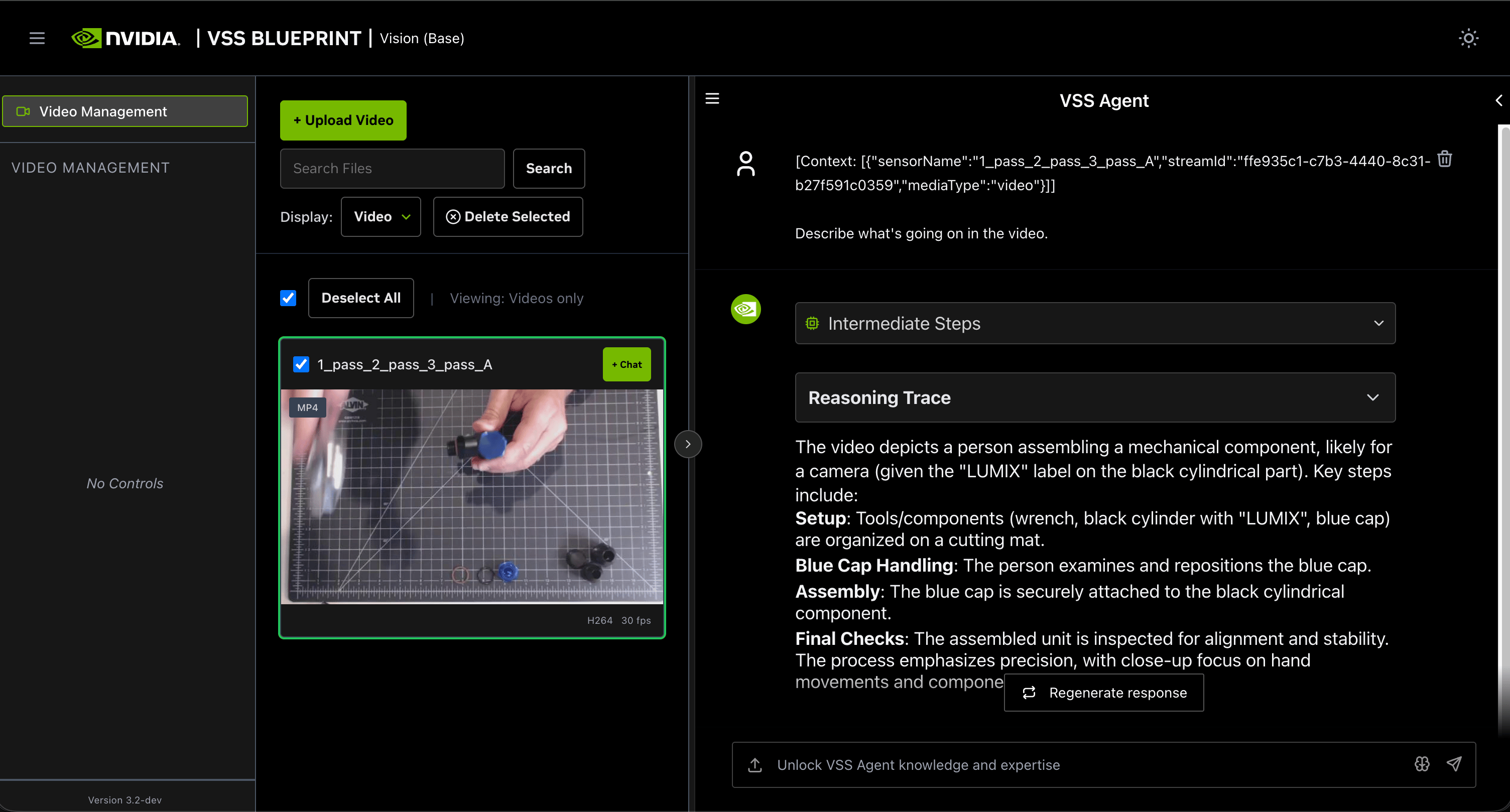
http://<spark-ip>:3000. Upload a video (+ Upload Video), select it, click + Chat, and ask, for example, “Describe what’s going on in the video.” Answers take 1–3 minutes.To confirm that Newton Fusion answered, on the DGX Spark:use_video_file_base64: True means VSS sends the full MP4, not frames.6
Shut it down (Spark)
Tips
-
Name the video and the tool in the question, and ask for one call. Nemotron sometimes replies with a clarifying question, or calls Newton Fusion several times and rewrites its answer. This wording keeps it to one call, with Newton Fusion’s answer passed through:
Analyze the video “<name>” with video_understanding. Call it once, on the whole video, with my request below word for word as its user_prompt, and present its result as your answer without analyzing again: <your question>
In our tests it cut a typical answer from about 220 s to about 100 s. - Ask for an explicit format for time stamps, such as “Put each step on its own line, in the form “MM:SS - MM:SS: what happens”, using the actual times from the video.” With a looser request, Newton Fusion may answer in one paragraph, and Nemotron may then invent step times when it rewrites the answer.
- Ask about what is said, not other sounds. Newton Fusion hears a video through its speech transcript, so narration and dialogue come through, but alarms, engines or music mostly don’t.
- Prefer Newton Fusion’s answer when the two differ. Newton Fusion answers deterministically (temperature 0). Nemotron’s rewrite is where details get dropped or changed.